
Quick definitions
- Retailer Product ID: the identifier we use to recognise a product on a retailer’s website. We choose one that is unique and as stable as possible, so it may differ from the product code shown on the retailer’s site.
- Option: a specific colour of a product, shown in the app as “option: [colour name]”.
- SKU: a specific size within a colour option. If the retailer doesn’t provide a unique SKU, we combine colour and size, and the app shows the size name (for example “medium”).
To tell one product from another, we collect these identifiers from the retailer’s website.
How do we tell products apart across retailers and regions?
We track thousands of retailers and regional sites, and the same ID can mean different things on different sites. For example, product 123 at Zara US is not the same product as 123 at Zara ES.
To keep products separate, we generate an EDITED hash ID at product and option level. This makes every product unique across the whole platform, even when the retailer’s own IDs match across sites.
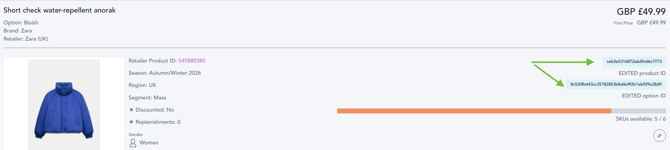
What is the relationship between Retailer Product IDs and options?
Where the retailer’s website allows it, we pick a Retailer Product ID that links all the colours of a style. Those colours then appear as options under one product in the app.
How are colour options handled?
It depends on the retailer’s website:
- If the site provides an ID that links colours, all the colours share one Retailer Product ID and appear as options on the same product.
- If it doesn’t, we use an ID that is unique to each colour. Each colour then appears as its own product and isn’t linked to the others in the app.
Can a colour name change create a new product card?
Yes. If a retailer renames a colour, we treat the new name as a new option, and this can generate a new product card in the app.
A new option doesn’t mean the Retailer Product ID has changed. The ID shared by the colour options stays the same, and only the colour name is new. This is different from a Retailer Product ID change, which creates a new product (see below).
Are Retailer Product IDs always the same as the retailer’s own IDs?
No. We often use the retailer’s own SKU or product code, but we choose whichever identifier is most stable and consistent, and best links colour options together without creating duplicates. If a retailer’s own code changes often, or isn’t shown consistently across colours, we may use a different one.
This means the Retailer Product ID in EDITED may not match the one on the retailer’s site or in your own systems.
How do we get Retailer Product IDs?
We collect them from the product information on the retailer’s website. The exact source varies by retailer and region, and can change if the retailer updates its site.
What can cause new-looking products or a break in history?
- A Retailer Product ID change: a new product is created, and the old product’s history can’t be linked to the new one. You may see a spike in New In, a temporary rise in option count while the old and new IDs overlap, and a break in the product’s history. We only change IDs when there’s no better option.
- A colour rename: a new option appears, and may show as a new product card. The Retailer Product ID is unchanged.
- A size format change (for example “L” to “l”, or “5.5” to “5.5UK”): new sizes can appear in a product’s size chart. No new product is created.
If you see unexplained changes, contact support with the retailer and the dates you’re looking at, and we’ll check what caused them.
Why am I seeing duplicate products?
The most common causes are:
- A colour was renamed by the retailer, creating a new option that can appear as a new product card.
- We changed a Retailer Product ID. This is rare, but sometimes necessary, for example when a retailer’s site update means the old IDs no longer exist, or to recover options that were being missed. Until the old IDs drop out, a product can briefly appear twice.
- The retailer’s site doesn’t link colours, so each colour is tracked as its own product.
If you’re not sure which applies, send us the links to the example products at support@edited.com and we’ll check.