
The EDITED Resource Center is your go-to hub for everything you need to get started and make the most of the platform. Whether you’re a new user or looking for the latest updates, we’ve got you covered.
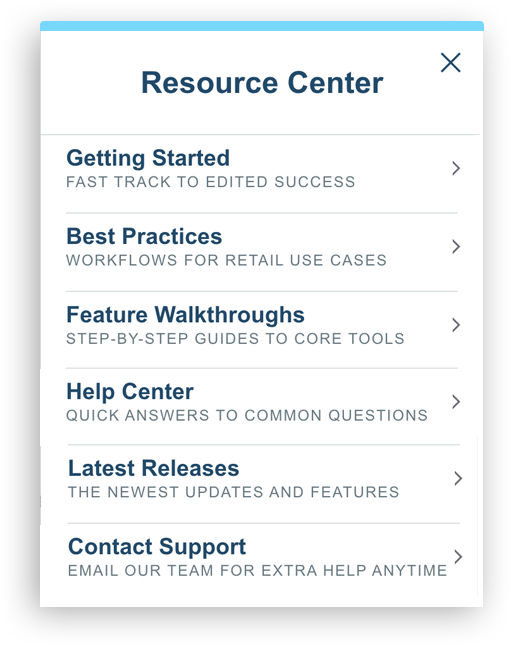
Resources you see in the Resource Center may vary depending on your organization's access.
Learn more about what to expect in each section of the Resource Center below:
Getting Started New to EDITED or looking for a quick refresher? Our Getting Started collection introduces you to the core features of myEDITED, including Research, Dashboards, and Opportunities. With a mix of short videos and step-by-step in-app guides, you can choose the learning style that works best for you and quickly get comfortable navigating the platform.
Best PracticesIf you’re looking for a structured, guided path through your analysis, our best-practice workflows are built for you. Each workflow spans multiple views to support a full retail use case and provides clear direction on what to explore along the way. It’s an efficient way to navigate the platform while following EDITED’s recommended approach to uncovering actionable insights.
Market Basics
Helps you build confidence in navigating and customizing EDITED’s Market data. They walk through how to effectively use filters and chart controls to tailor views, refine datasets, and set up workbooks for success from the start.
COMING SOON: Enterprise Basics
Helps you build confidence in navigating EDITED Enterprise and its functionality. These resources walk through how to save and share analysis, apply filters, use the search filter, and set up metric and item alerts.
Market Feature WalkthroughsA focused, step-by-step tour of a single analysis tool, Feature Walkthroughs are the fastest way to master specific functionality. Follow our recommended approach to get started, then experiment and customize the analysis to fit your use case. Ideal for teams who want to unlock the full value of each tool.
COMING SOON: Enterprise Feature Walkthoughs
A focused, step-by-step tour of a single Enterprise feature, these walkthroughs are the fastest way to learn a specific feature. Follow our recommended approach to get started, then explore how to apply the feature using your own business data. Ideal for teams who want to maximize the value of their internal metrics and workflows.
Help Center Access our comprehensive library of articles for quick answers, detailed how-tos, and guidance on maximizing value from EDITED. Browse by topic or use search to find exactly what you need, from troubleshooting tips to deep dives on specific features.
Latest Releases Discover what’s new in EDITED with our latest feature releases and platform improvements. From small refinements to major launches, you’ll find everything you need to stay informed and take advantage of new capabilities.
Contact Support Need help? You can easily raise a ticket with our support team directly from the Resource Center within the app. Our team is here to provide guidance and ensure you get the most from EDITED.