What data is included in AskEDITED?
- AskEDITED has access to the below EDITED data sources:
-
Market data (2 years of history, apparel only)
- Messaging data (dating back to October 2025)
- Research articles
-
The data available to you in AskEDITED will reflect the data you have access to in Market/myEDITED. E.g. if your subscription currently includes access to UK and DE regions, this is the data AskEDITED will provide insight/summaries on.
What languages does AskEDITED support?
-
English is currently the only supported language in AskEDITED. Like many conversational AI tools, you may find that asking a question in another language will return results. However English is the language AskEDITED has been trained in.
How can I share a conversation with a colleague?
-
A conversation can be shared by simply clicking the 'share' button in the top right-hand side of your AskEDITED screen:
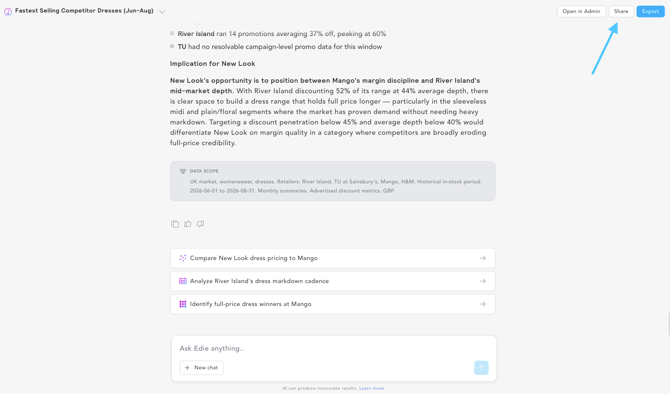
- You'll then be prompted to select if you want to keep this conversation private (only you can open the conversation) or share it with your organisation (anyone with the link in your organisation can view the conversation).
-
When a colleague opens your shared link, they will initially view the conversation in a 'view only' state. They then have the ability to Duplicate the conversation into their own account.
-
Once duplicated, you can continue the chat, ask follow-up questions, and run your own prompts based on the original analysis!

-
I've shared a conversation with a colleague but they can't access it. Why is this?
-
To share a conversation with a colleague you must select the 'share' button in the top right-hand corner of your AskEDITED screen and select to share with your organisation. If you simply copy & paste the URL from the browser, this won't share correctly.
- If you have shared using the share button and this isn't working, it's likely the colleague you're sharing this with doesn't have access to AskEDITED. In this case, please ask that they reach out to Support (by clicking Help > Get Help in the top right-hand corner of the EDITED page or emailing support@edited.com) and a member of our team will take a closer look.
Can I export my AskEDITED conversations?
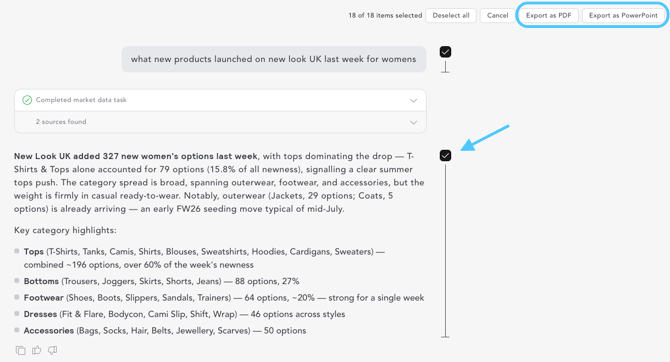
- Yes! Simply click the export button in the top right hand corner of your AskEDITED conversation. Once selected, you can choose to export as PDF or PowerPoint
- When using the export button, you have full control over the final document. You can easily edit the export by selecting or deselecting specific sections, meaning you can remove irrelevant questions, answers, or tangents to create a clean, refined report.
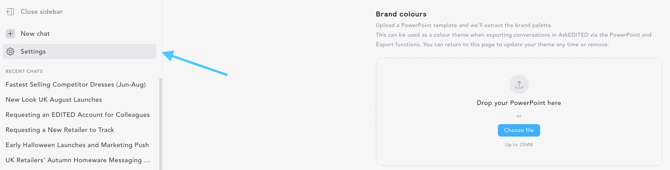
When exporting as PDF or PowerPoint, you can ensure your custom brand colour palette is used! Simply upload a template via your settings in AskEDITED for this to be used on any future exports.
How can I trust that the summary/data provided is reliable?
- As with any conversational AI, we always recommend reviewing and validating the outputs before using them to make any business decisions. Since Edie uses the same underlying data as your existing Market access, it is subject to the same potential data quality challenges. We'd recommend reading our how does EDITED collect market data and how does EDITED use generative AI articles to learn more.
- Outside of this, if you're ever confused by a metric provided, want clarity on how the information has been summarised, aggregated etc. the best way to understand more is to simply ask Edie in the conversation itself! For example:
- I know X retailer launched new products this week, why are none showing in the chart provided?
- The discount percentage looks too low for X retailer. Explain how you calculated this, what average has been used?
What AI/LLM model powers AskEDITED
-
AskEDITED uses a variety of LLM models from multiple leading providers, which we regularly update as the technology improves. This allows us to balance quality and speed effectively, ensuring we are always utilising the best tools to provide the optimal experience when using AskEDITED for analysis.
My conversation is taking a long time to load. What should I do?
- As a general rule, you can expect faster loading times when asking simple questions, such as asking for the number of new products launched this week at one or two specific retailers.
- Complex questions such as requesting analysis across multiple retailers, categories, or broken down into several chart types, will naturally take longer to process and generate.
- For general feedback regarding loading times, we encourage you to submit this directly via the feedback form available within the AskEDITED interface (just click the 👍/👎).
If your conversation is taking a long time to load without reason, e.g. you ask a simple question but this is continuously loading, or you notice glitching, or other behaviour that feels more like a technical issue, please reach out to our support team (click Help > get help in the top right hand corner of your EDITED screen). Remember to share the URL link to your specific conversation!
How can I delete a conversation I no longer need?
-
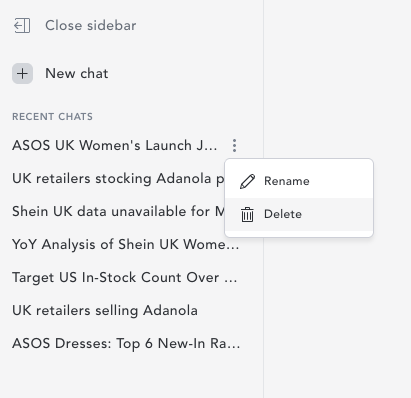
Within the AskEDITED sidebar, select the 3 dots next to the conversation you want to delete and select delete.
- Please note that deleting a conversation is permanent. We cannot retrieve conversations once these have been deleted.